The .mangaplay Format - Plain-Text Manga & Comic Script Spec

Are you trying to make your Manga or Comic but having trouble with a manga script format? Then, please allow me to introduce you to Mangaplay aka Mangaplay Studio.
The mangaplay format is in addition to the Fountain format. If you wanted to create a Mangapage that looked like this, a Horizontal Panel up top with three panels in the center then a final horizontal panel.
+-------------+
|.....P1......|
+---+-----+---+
|.P2|..P3.|.P4|
+---+-----+---+
|.....P5......|
+-------------+
# Page 1 INT. PREMIUM HOTEL ROOM
Panel 1 [H]
Panel 2 [GROUP]
Panel 3
Panel 4
Panel 5 [H]You're script would look something like the LIGHT BLUE and Mangplay would make a storyboard similar to the ascii format for you as an image. That's the comic script syntax in action - a few directives, no prose padding, and the layout falls out of it.
The INT. PREMIUM HOTEL ROOM slug up there wasn't an accident. Mangaplay borrows the same slug-line convention that Fountain uses, so your script already reads like a screenplay - and that means it converts cleanly to one.
That's actually useful beyond just format nerds: the screenplay-writing community is a solid place to get story feedback, because those writers judge your plot and dialogue on their own merits. They're not going to dock you points because your panel six looks like it was drawn with a broken crayon.
Mangaplay format tags: Fountain compatibility and writing flow
The tool supports auto formatting for Comics or Manga. They can be toggled at any point, by default it will be a Manga format (read right to left); Auto-panel arragement rules will take affect so you care free to start your script out something like this
# Page 1 EXT. CAR PARK

Panel 1
Panel 2
Panel 3
...
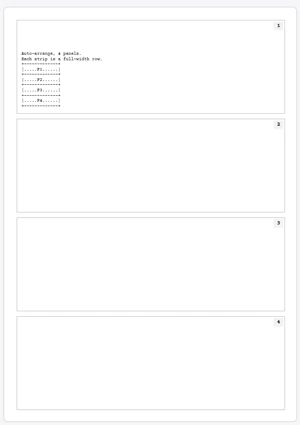
All three layouts below come from the same kind of script — just plain panels, no tags. The number of panels you write is the only difference between the following renditions, with the rendered storyboard sitting next to them at matching height.
+-------------+
|.....P1......|
+-------------+
|.....P2......|
+-------------+
|.....P3......|
+-------------+
+-------------+
|.....P1......|
+-------------+
|.....P2......|
+-------------+
|.....P3......|
+-------------+
|.....P4......|
+-------------+
Both the Chrome Extension and The Website version have it so you can visualise and draw on the storyboard in realtime. Your artwork is saved in your browser as you go.
Panel directives at a glance
Here's the working set of tags. Stack them on the same line as the panel - shape first, then a size modifier, then a style tag.
[H]- Horizontal panel. Fills the row.
[V]- Vertical panel. Tall column. Plain panels after it absorb into its right side.
[WIDE]- Hero shot. Bleeds about 15% past the row into the page margins. Use sparingly.
[SPREAD]- Splash page. The panel fills the entire page on its own.
[GROUP]/[G]- Opens a shared row. Plain panels after it join the row until the next layout tag closes it. Holds up to six.
[INSET]- A small window inside the panel above it - a close-up tucked into a corner.
[SPLIT]- Dotted line through the middle of one panel. Top half and bottom half, same outer size.
[BLEED]- Border draws as faded dots. Same size as the default; only the frame style changes.
[BORDERLESS]- No border at all. Artwork reads clean with no frame.
[S]/[L]- Size modifiers. Small (about half) or Large (twice the default in the panel's main axis).
[END]/[LAST]- Anchors a tall panel at the END of its row. Mirrors the default which puts it at the start.
Stacking tags that fight each other - like [S][L] or [H][V] - still draws but flags a warning on the line. The full reference manual lives in the tool itself.
What the mangaplay format is (and what it's not)
The mangaplay format is plain text comic script, full stop. Where a panel goes and how big it is isn't guesswork - it's maths. A [H] tag tells Mangaplay to make a horizontal panel. A [V] tag makes it vertical. The reference manual determines the rest. No prompt. No black box. Just a spec you can read and a tool that follows it.
The math behind the panels (not AI, not magic)
If you've looked at the tool and accused it or anyone around here of being AI-generated - I despise you, genuinely.
Robots are slaves. The end.
Myself and the people I work with have gone out of our way to make the best things we can make. We're very clear about what we use LLMs for and what we don't. It's not a debate - it's right there on our credits page.
Go debate a wall.
Sorry for the rant. I'm tired of the word A.I everywhere.
For the adults in the room: the whole point of a tool like this is to get your story from your head to your hand to something other people can actually read - without becoming a prompt slave in the process.
Exporting a screenplay to PDF
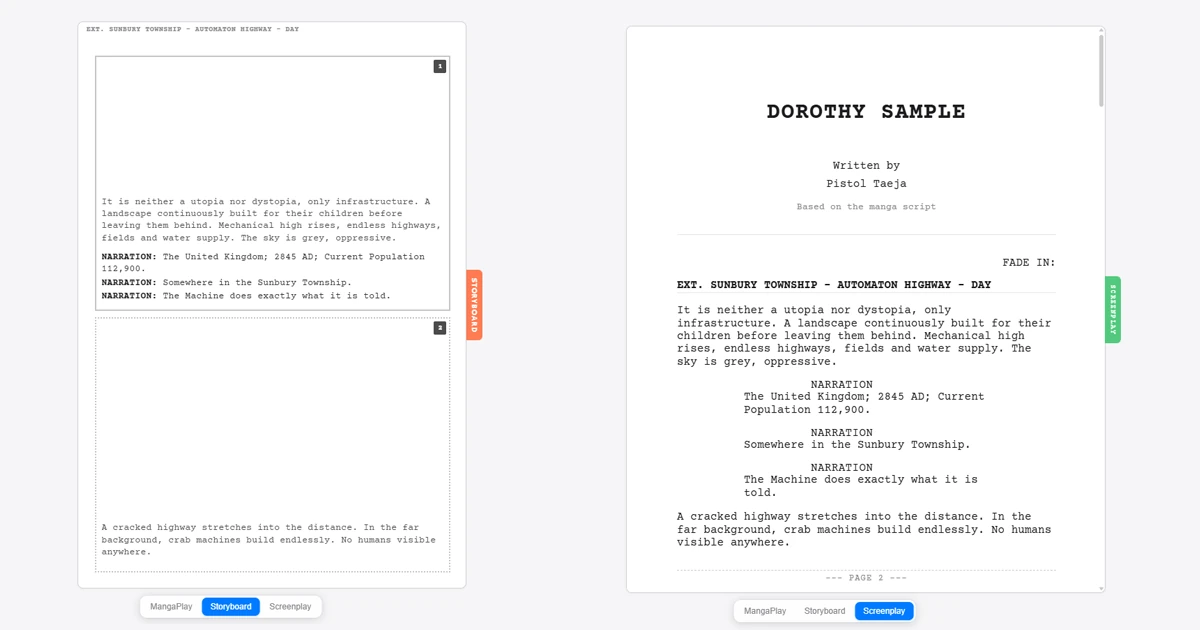
Mangaplay has a 1-click Export button that converts your .mangaplay script straight to a Screenplay-formatted PDF. You hit export, you get a PDF, you send it to your collaborator. That's the whole story.
It's not trying to replace a proper screenwriting tool. If you're deep into feature film territory and need industry-standard formatting, revision tracking, scene breakdowns - go use Celtx. That's what it's built for. The PDF export in Mangaplay is specifically for the moment you want to hand your manga or comic script to an artist or co-writer without making them install anything or figure out what a panel directive is.
That said, I know some writers just prefer working in screenplay format full stop, and right now the PDF option is pretty bare. I'm working on expanding that. `.fountain` and `.fdx` export are both coming soon, so if your whole workflow lives in one of those formats, hang tight.
Conclusion
I write, draw and review the screenplay all at the same time while making Dorothy, Salaryman and everything else I have ever written.
If you also prefer writing then I hope you can find value in Mangaplay. Shout at me and I'll try my best to improve it for your use case. Anything to get more art out there into the world.